


Buying a Copilot license does not transform a company's operations. This is the first misconception that IT teams and business leaders need to dispel before any generative AI implementation project in Microsoft 365.
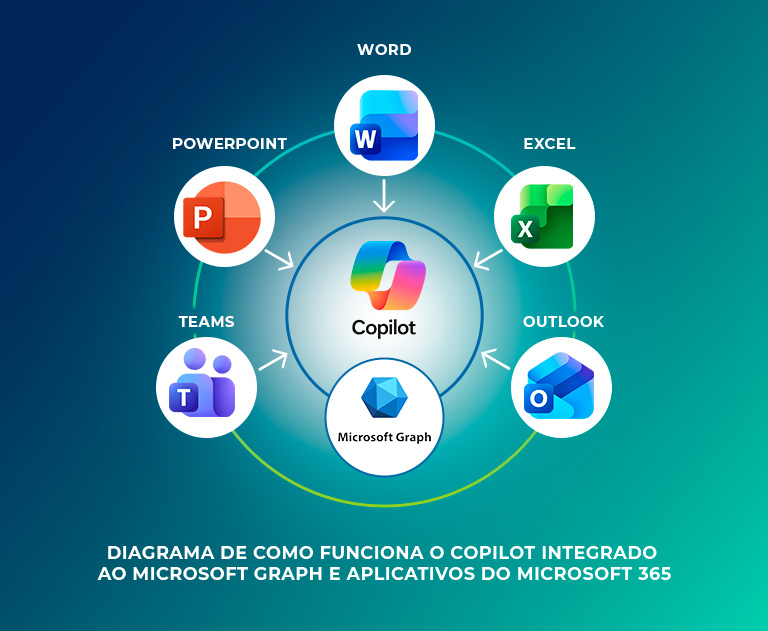
Copilot is an artificial intelligence layer that interprets natural language commands within Word, Excel, PowerPoint, Teams, and Outlook. The practical result, however, depends directly on how company data is organized, protected, and governed.
As long as the environment remains poorly configured, employees will continue to spend hours on tasks that could already be automated.
That is why this article details the technical operation of Copilot in Microsoft 365, its functions in each application, the benefits for operations, and the path to implementing it without creating security gaps.
Copilot is a generative artificial intelligence assistant natively integrated into Microsoft 365 applications. It interprets natural language commands and executes tasks based on the data the user already has permission to access.
Its operation depends on two central components.
1. the first is the large language model (LLM), responsible for interpreting the command and generating the requested response or content.;
2. the second is the Microsoft Graph, the layer that connects the model to the emails, files, meetings, and conversations stored in the company's tenant.
This combination distinguishes Copilot for Microsoft 365 from a generic assistant, as the response is not based solely on public knowledge, but on the organization's actual context, respecting the permissions already configured for each account. Therefore, this intelligence manifests differently in each application.
Copilot can generate complete drafts from a text prompt in Word, referencing existing corporate files in SharePoint or OneDrive.
It also condenses lengthy documents into objective summaries and applies formatting consistent with company standards, reducing the time spent structuring proposals and reports.
In Excel, the tool identifies trends in large datasets, converts natural language prompts into complex formulas, and creates charts and dashboards from a single instruction, reducing the reliance on advanced knowledge of functions like VLOOKUP and pivot tables.
Copilot transforms text documents—a Word report, for example—into complete presentations, with narrative structure and design aligned with the company's visual identity, reducing the manual work of assembling slides.
Finally, Copilot can generate automatic minutes during online meetings with Teams, identifies decisions and pending action items, and produces real-time summaries that allow a late attendee to catch up on the context without interrupting the agenda.
Finally, integrated into Outlook, the AI can triage your inbox by priority, summarize long message threads, and suggest or draft replies, adjusting the tone of voice according to the recipient and the context of the conversation.
Adopting generative AI in the corporate environment produces productivity gains that go beyond the speed of executing isolated tasks.
Perhaps the most significant benefit is the reclaiming of work hours for strategic team initiatives, as operational tasks no longer consume the schedules of analysts and managers.
Among the most consistent gains observed are:
● Automation of manual and repetitive tasks, such as email triage and report generation;
● Acceleration of the learning curve and employee creativity;
● Improvement in communication and asynchronous alignment between teams.
Before making any purchasing decision, it is necessary to distinguish between the available licensing models, as each implies a different level of access to corporate data.
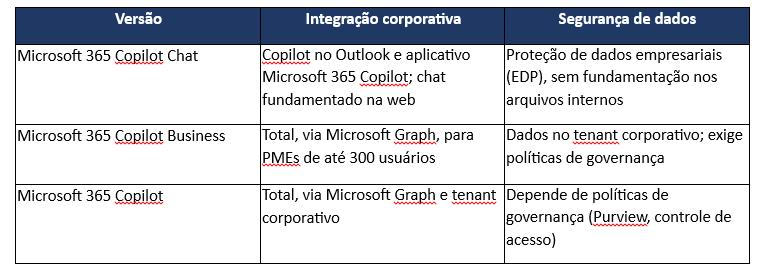
· the Microsoft 365 Copilot Chat is available at no additional cost to users with a corporate account linked to an eligible Microsoft 365 plan. It offers web-grounded AI chat with enterprise data protection and IT controls, in addition to Copilot in Outlook and access to consumption-based agents;
· the Microsoft 365 Copilot for Business is the paid license aimed at small and medium-sized businesses (up to 300 users), which adds native Copilot to Word, Excel, PowerPoint, Outlook, and Teams, grounded in the corporate tenant's data;
· the Microsoft 365 Copilot is the paid license for larger organizations, charged per user, with the same integration into the company tenant via Microsoft Graph and additional analysis and agent features. It is these paid licenses, for Business and Copilot, that support the use cases described above.
Copilot indexes and processes everything the user already has permission to access within the tenant.
This is, at the same time, the tool's greatest advantage and its primary risk, because if permissions are poorly configured, the AI can expose financial spreadsheets, contracts, and HR data to employees who should never have had access to that content.
Unlike a traditional security breach, this exposure does not depend on an external attack. It stems from permission settings inherited from years of disorganized environment growth, without periodic reviews of who accesses what.
Mapping permissions, applying the Zero Trust principle, and configuring data loss prevention policies via Microsoft Purview before releasing Copilot is not an optional project step. It is what determines whether the tool will generate productivity or a data leak incident.
Stable Copilot operation depends on an IT environment that is updated and continuously monitored, which explains why the concept of IT as a Service (ITaaS) has become central to corporate AI implementation projects.
An environment with configuration flaws or IT infrastructure without technical support compromises tool performance and increases the security risks described above.
There is also a frequently overlooked layer regarding how the intensive use of AI generates a growing volume of critical information, summaries, drafts, and automated analyses that also require protection.
That is why an integrated cloud-to-cloud backup strategy, such as Acronis, is necessary, independent of Microsoft 365's native version history.
Frayha's TIaaS structures this foundation with:
● Humanized technical support, with defined SLAs and consultative service;
● Proactive infrastructure updates;
● Cloud-to-cloud backup via Acronis, with an appropriate retention policy;
● Continuous environment monitoring, with visibility into performance and security.
Generative artificial intelligence is already an operational reality, but the return on investment in Copilot does not come from the Microsoft license itself.
It comes from proper permission management, data governance, and continuous control over an environment that is constantly changing. The real project is the secure transformation of how the company handles its data and productivity.
Don't leave your data security to chance. Speak with Frayha's consultants and schedule a diagnostic of your Microsoft 365 environment to begin the secure implementation of Copilot.
Microsoft 365 Copilot Chat is included at no additional cost in eligible Microsoft 365 business plans. To use Copilot natively in Word, Excel, and Teams, grounded in your business data, you need a paid license—either Microsoft 365 Copilot for SMBs or Microsoft 365 Copilot—which incurs an additional per-user cost.
The public version of ChatGPT trains its models using information from the internet and user interactions. Microsoft 365 Copilot operates within an isolated environment—your corporate tenant—and accesses internal emails and files via Microsoft Graph without using that data to train public models, ensuring your company's information remains private.
Any employee with an active business license. However, experts recommend granting access only after IT has configured governance mapping and permissions, ensuring that each user can only view information relevant to their role.

Understand what MDR is, how 24/7 detection and response works, and why companies can better protect their environments with specialized monitoring.

Learn the difference between data backup and recovery, understand RPO and RTO, and prepare your company to act when things go wrong.
Copilot, ChatGPT, Claude e Gemini já estão na sua empresa. Mas quem controla o que é compartilhado? Entenda tudo sobre governança de IA.

Schedule a conversation with our experts and discover how we can protect and boost your business, with no obligation.