



Data backup and recovery are concepts often treated as synonyms, but they represent different stages of protecting a company's information.
This is because having copies of files and documents stored is important, but it does not, in itself, mean that the organization will be able to restore systems and resume operations when an incident occurs.
This detail usually comes to light at the most critical moment. If a copy exists, but no one knows how long it will take to restore it or if the process actually works, the company still has an operational vulnerability.
In this article, you will understand the difference between backup and recovery, learn about the concepts of RPO and RTO, and discover why testing your plan is just as important as maintaining the copies. Read on.
Backup is the preventive copying of data created before any incident, with the goal of ensuring that information can be recovered if the original is lost, corrupted, or compromised.
It can be stored locally, in the cloud, or in a hybrid model, and its effectiveness depends directly on the frequency with which it is performed, the integrity of the copies generated, and the actual ability to restore when necessary.
Data recovery is the reactive process that takes place after an incident has already occurred.
It involves identifying what was lost or compromised, selecting the appropriate restore point, ensuring the integrity of the recovered data, and bringing systems back online within an acceptable timeframe for the business.
When a backup exists and is intact, recovery tends to be straightforward. However, in scenarios where the backup has been compromised along with the production environment—as often happens in ransomware attacks that reach copy repositories—advanced technical recovery requires specific tools and expertise to attempt to reconstruct data from fragments, logs, or unaffected previous versions.
This distinction is relevant: recovery is not synonymous with simple restoration.
The two processes operate at different times and with different objectives. Here are the main points of difference:
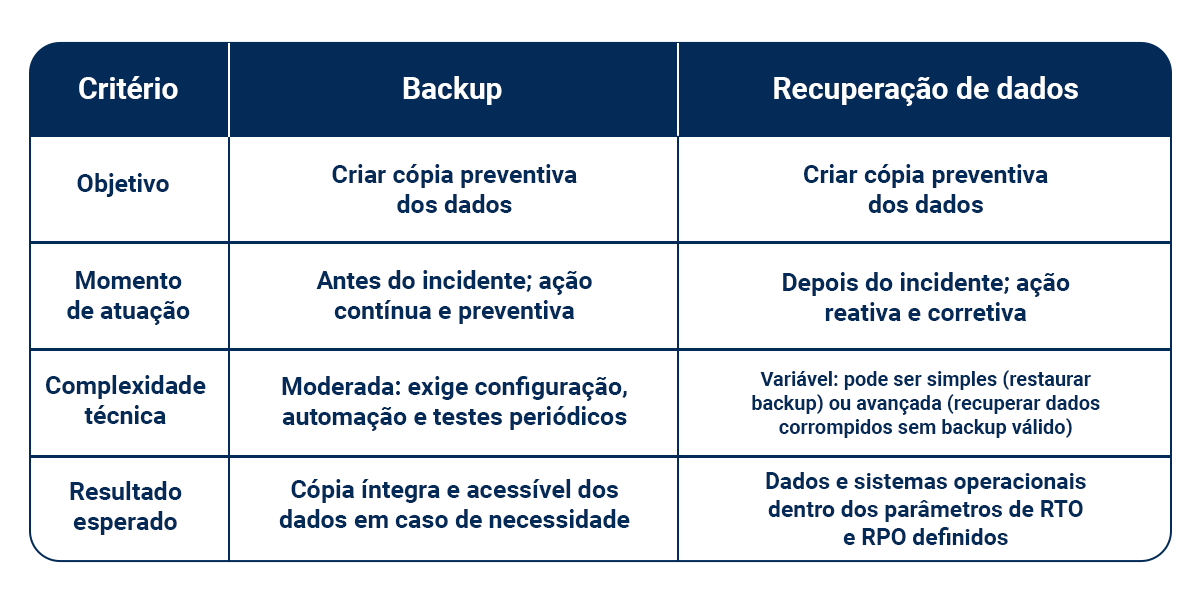
In other words, while backup prepares a source for restoration, recovery defines and executes the path to return to expected operation.
This difference seems simple, but it completely changes how a company should evaluate its protection.
After all, an organization may have daily backups and still not know if it will be able to recover a critical system within the required timeframe.
Backup without a tested recovery plan is one of the most common pitfalls in corporate environments.
This is because the copy may exist, the process may be configured, and reports may show daily success.
However, when an incident occurs and the team tries to restore the data, they discover that the backup was corrupted, that the restoration process takes much longer than the operation can tolerate, or that the recovered data is from three days ago, not yesterday.
Thus, the only way to know if a backup works is to test it under real conditions, frequently and with the time and volume parameters that the operation requires.
Without this testing, the company has a copy of data, but not necessarily an effective protection strategy.
The reverse path is also problematic. Recovery without consistent backup is, in practice, like crisis management without tools.
When there is no intact and accessible copy, the options are few and expensive. That is why the two processes must be planned, configured, and tested together, as parts of the same strategy, not as separate initiatives.
Understanding the sources of data loss is the first step toward scaling the right protection strategy.
The most frequent vectors in corporate environments combine external threats, internal behaviors, and infrastructure failures, often coexisting in the same environment without the company having visibility into all of them.
See below:
Ransomware encrypts data and systems, making them inaccessible until a ransom is paid, with no real guarantee of recovery.
Modern criminal groups operate using a double-extortion model: in addition to encrypting data, they exfiltrate it and threaten to publish it if the ransom is not paid.
The aggravating factor for poorly configured backup strategies is that targeted attacks often reach backup repositories before triggering encryption, eliminating the primary recovery route.
The connection between secure backup and cybersecurity strategy is not optional: it is structural.
Accidental deletions, file overwrites, incorrect formatting, and misconfigurations account for a significant portion of corporate data loss.
In environments with automatic synchronization, such as OneDrive and Google Drive, a file deleted by an employee propagates immediately to all connected devices, wiping out the local copy before anyone notices the mistake.
The native recovery window for these platforms is time-limited, and any incident discovered after that period results in permanent loss if there is no independent backup.
Hard drives fail, servers overheat, and software updates can corrupt databases and partitions.
Equipment that has reached the end of its service life or lacks preventive maintenance carries a risk of physical failure that no security software can mitigate.
Environments without hardware redundancy and up-to-date backups are completely exposed to this type of loss, which rarely provides any advance warning.
Fires, floods, prolonged power outages, and cooling failures in local server environments represent physical risks that can destroy both data and equipment simultaneously.
Companies that keep all backup copies in the same physical location as their production environment have no real protection against these events, regardless of how many local copies exist.
The choice of backup type directly impacts execution time, storage space consumption, and recovery speed.
Therefore, understanding the main types and options is essential for configuring a strategy that suits the data volume and tolerance of each environment.
These are:
Copies all selected data every time it runs, regardless of whether changes have been made since the last backup.
It offers the simplest and fastest restoration, as everything is contained in a single data set.
However, consumes more storage space and execution time, making it less viable in high-volume data environments when performed frequently.
Copies only the data that has been changed or created since the last backup, whether it was a full or incremental one.
Consumes less space and execution time per cycle, making it ideal for high-volume data environments with limited backup windows.
Recovery, however, requires the full backup plus all subsequent incremental ones, increasing the complexity of the restoration process.
Copies the data changed since the last full backup, ignoring previous differential backups.
Occupies more space than incremental over time, but simplifies recovery: you only need the full backup and the most recent differential.
It is a middle ground between full and incremental, balancing execution speed and ease of restoration.
Two metrics define the true benchmark for a backup and recovery strategy: RTO and RPO. Learn what they mean and what they measure:
· RTO (Recovery Time Objective): the maximum time the company can afford to be without a specific system or data before the impact becomes unacceptable. An RTO of four hours means that operations must be restored within four hours of the incident. Critical environments, such as sales or production systems, generally require very short RTOs.
· RPO (Recovery Point Objective): the maximum amount of data the company is willing to lose, measured in time. An RPO of 24 hours means that the oldest backup that can be used is from yesterday, and any data created after that may be permanently lost. The more critical the data, the lower the RPO should be.
Defining RTO and RPO before choosing tools is what determines the backup frequency, storage model, necessary testing, and the level of redundancy that the environment needs. Without these parameters, any backup solution is generic and may fail to support operations when it matters most.
Frayha conducts this definition process as part of the environment assessment, ensuring that the protection strategy is proportional to each company's actual risk.
Setting up backups is just the beginning. Maintaining an effective strategy over time requires practices that go beyond the automatic execution of copies.
At Frayha, we apply these practices to the environments we manage, currently protecting over 180 TB of cloud data for our clients.
· 3-2-1 Rule: keep three copies of data on two different types of media, with one stored off-site. For modern environments, this has evolved into 3-2-1-1-0: the additional copy must be immutable, and testing must confirm zero recovery errors.
· Periodic restoration testing: a backup that has never been tested offers no real guarantee. Simulating restorations under near-real conditions, with frequency and documentation of results, is the only way to confirm that the process works when needed.
· Automation and monitoring: manual backups rely on consistent human execution. Automating the process and setting up alerts for failures ensures continuous coverage without depending on team availability.
· Backup data encryption: copies stored without encryption are vulnerable to unauthorized access, especially in cloud environments. Encrypting data protects the copy even if the repository is compromised.
· Immutability: configuring backup repositories to prevent modification or deletion during the retention period prevents ransomware or users with privileged access from compromising copies
One of the most common misconceptions among companies that have migrated to the cloud is believing that Microsoft and Google back up their customers' data.
They do not.
The providers ensure platform availability and geographic replication of services, which means the environment stays online even if a data center fails.
However, the responsibility for protecting and recovering data stored in that environment lies with the company, not the provider.
In practice, this means that accidental deletion of emails in Exchange Online, the removal of a document library in SharePoint, or file corruption in Google Drive due to human error or an attack can result in permanent loss if there is no independent backup configured.
The native recovery windows of these platforms have time limits and do not cover all loss scenarios, especially those related to attacks operating within the environment using legitimate credentials.
Frayha works with Acronis Cyber Protect Cloud and Keepit to cover exactly this gap.
Thus, we offer cloud-to-cloud backup for Microsoft 365, Google Workspace, and other critical SaaS applications, with storage independent of the original providers, configurable retention, and granular restoration of individual items such as emails, files, and Teams records.
Hiring a backup solution only solves part of the problem. To turn data protection into recovery capability, you need to understand your environment, map critical systems, define priorities, establish RPO and RTO, and validate that the plan actually works.
This is precisely where the consultative approach of Frayhacomes in.
With Acronis Cyber Protect Cloud, Frayha covers complete hybrid environments:
· Microsoft 365 and Google Workspace backup;
· physical servers;
· virtual machines;
· end-user devices, with integrated disaster recovery and active ransomware protection.
With Keepit, we offer specialized cloud-to-cloud backup for SaaS data, stored on infrastructure completely independent of the original providers, featuring architectural immutability and granular restoration.
This technical coverage integrates with Microsoft Defender, Microsoft Purview, and 24/7 MDR, ensuring that data protection is connected to your environment's security posture, rather than operating in parallel to it.
The result is a strategy where backup and recovery have defined RTOs and RPOs that are tested and monitored continuously, rather than just set up and forgotten.
For companies that want to understand how their current backup and recovery strategy compares to this standard, Frayha's free assessment is the starting point.
👉Request your free business assessment and find out if your company's backup and recovery strategy protects what cannot be lost.
No. Backup is the preventive process of creating copies of data before any incident occurs. Data recovery is the reactive process of restoring data and systems after a loss or compromise. The two are complementary: backup without a tested recovery plan is a copy with no guarantee of usability; recovery without consistent backup is crisis management without the right tools.
It depends on the RPO defined for each type of data or system. Critical environments, such as sales databases or financial systems, may require backups every hour or multiple times a day. Less sensitive environments can operate with daily backups. The key is that the frequency should be defined based on the actual impact of losing a specific volume of data, rather than generic standards.
Disaster recovery is the structured plan that defines how operations will be restored after a critical event, covering systems, data, processes, and teams. Backup is a component of disaster recovery, but not the only one. A complete DR plan defines RTO and RPO, establishes responsibilities, documents restoration procedures, and is tested periodically. Having backup without DR is like having raw materials without a manufacturing process.
It depends on how it is configured. Backups stored in the same environment as production, accessible via the same credentials, can be compromised along with the original data during a ransomware attack. Immutable backups, stored in an isolated repository with independent access, resist this type of attack because they cannot be altered or deleted, even with compromised credentials.
Business continuity is a broader strategy that ensures a company's critical operations can continue to function during and after an incident, even if at a reduced capacity. Data backup and recovery are essential components of this strategy, but business continuity also involves system redundancy, communication plans, alternative processes, and teams trained to respond to crises in ways that go beyond technical data restoration.

Understand what MDR is, how 24/7 detection and response works, and why companies can better protect their environments with specialized monitoring.
Copilot, ChatGPT, Claude e Gemini já estão na sua empresa. Mas quem controla o que é compartilhado? Entenda tudo sobre governança de IA.

Do you know where the danger comes from? Discover the 8 cyber risks threatening your company and learn how to take action!

Schedule a conversation with our experts and discover how we can protect and boost your business, with no obligation.